

The 12-Hour Variance Analysis Problem: How AI Solves FP&A’s Biggest Time Drain
Introduction: The Weekly Time Drain Every FP&A Professional Knows Too Well
If you’re an FP&A professional, you know the drill. Every month-end, you spend countless hours buried in spreadsheets, manually comparing actuals to budget, investigating variances, and preparing reports for stakeholders. What should be strategic analysis becomes a tedious data processing exercise that consumes 12+ hours of your week.
According to recent industry research, FP&A professionals spend an average of 60-70% of their time on data collection and manipulation rather than strategic analysis . This isn’t just inefficient—it’s preventing finance teams from delivering the insights that drive business value.
The variance analysis process, in particular, has become the poster child for manual, time-consuming FP&A work. But here’s the good news: artificial intelligence is fundamentally changing this reality.
In this comprehensive guide, we’ll explore how AI-powered tools can reduce variance analysis time by 75%, improve accuracy by 5-10%, and free you to focus on what truly matters—strategic decision-making and business partnership.
The Anatomy of the 12-Hour Variance Analysis Problem
Breaking Down Where Time Actually Goes
Let’s dissect a typical weekly variance analysis process to understand where those 12 hours disappear:
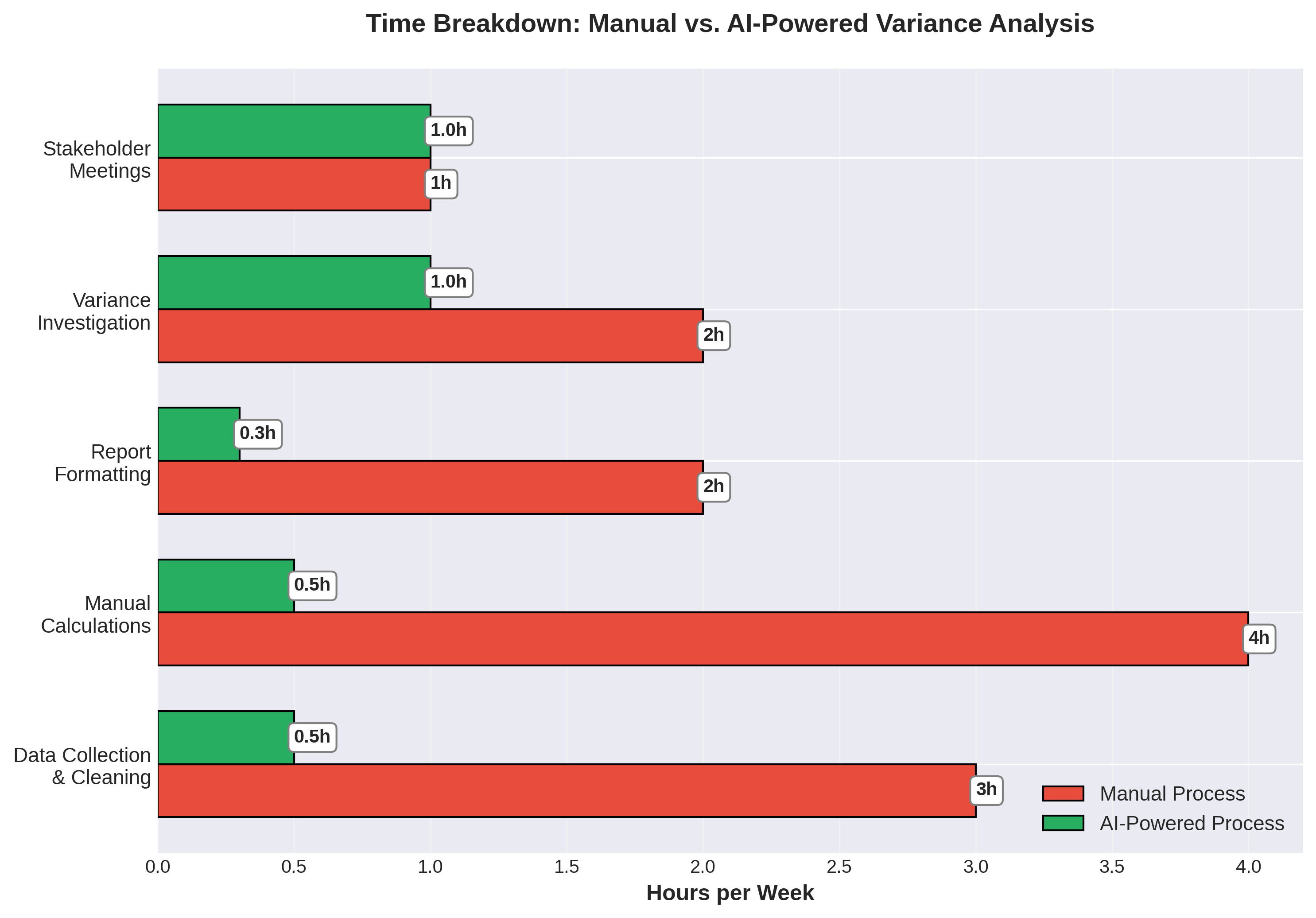
1. Data Collection & Cleaning (3 hours)
The first challenge is gathering data from multiple sources—ERP systems, departmental spreadsheets, external databases. Then comes the tedious work of:
•Reconciling different data formats
•Fixing inconsistencies and errors
•Standardizing account codes
•Dealing with missing or incomplete data
2. Manual Calculations (4 hours)
Once data is clean, you’re calculating:
•Variance amounts (Actual vs. Budget, Actual vs. Forecast, Actual vs. Prior Year)
•Variance percentages
•Cumulative variances
•Trend analysis across periods
All of this happens in Excel, with formulas that need constant validation and error-checking.
3. Report Formatting (2 hours)
Creating professional-looking reports involves:
•Building tables and charts
•Color-coding significant variances
•Adding commentary placeholders
•Ensuring consistency with corporate templates
4. Variance Investigation (2 hours)
The actual analytical work—identifying root causes of significant variances—often gets squeezed into just 2 hours because you’ve spent 10 hours on data processing.
5. Stakeholder Meetings (1 hour)
Finally, presenting findings to business partners and answering their questions.
The Hidden Costs Beyond Time
The 12-hour time investment is just the tip of the iceberg. The real costs include:
Opportunity Cost: What strategic projects aren’t getting done because you’re stuck in spreadsheets? According to a 2025 survey by FP&A Trends, 73% of finance professionals report that manual processes prevent them from adding strategic value .
Error Risk: Manual data processing introduces errors. Even with careful review, studies show that 88% of spreadsheets contain errors . A single misplaced decimal or incorrect formula can lead to flawed business decisions.
Delayed Insights: By the time you finish your analysis, the data is already outdated. In today’s fast-paced business environment, real-time insights are becoming table stakes.
Employee Burnout: Repetitive, low-value work leads to disengagement. The same FP&A Trends survey found that 65% of finance professionals cite monotonous tasks as a primary source of job dissatisfaction .
How AI Transforms Variance Analysis: From 12 Hours to 3
The AI-Powered Approach
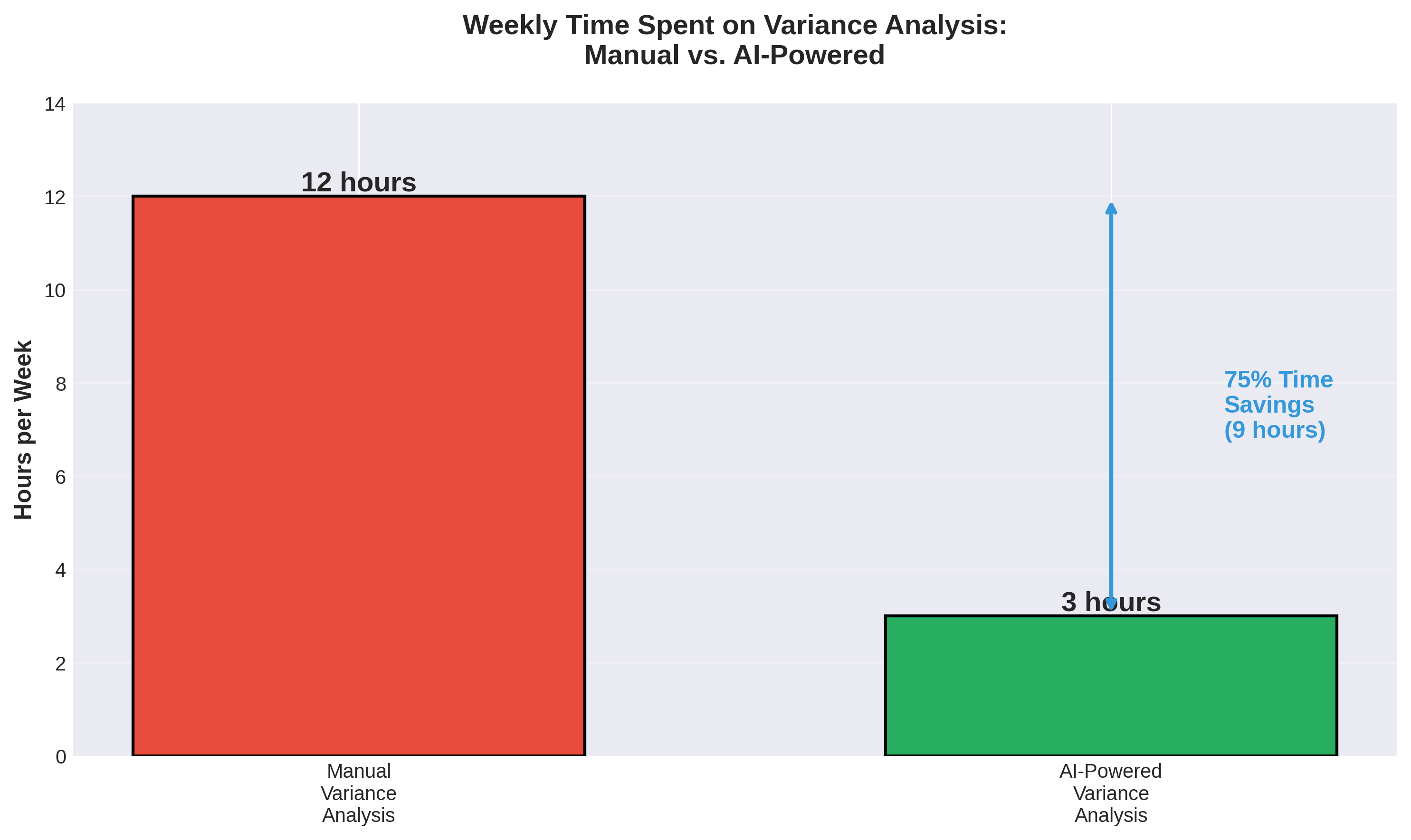
Modern AI tools can automate up to 75% of the variance analysis process, reducing the weekly time investment from 12 hours to just 3 hours. Here’s how:
1. Automated Data Integration (30 minutes vs. 3 hours)
AI-powered platforms like Microsoft Copilot Studio and Power Automate can:
•Automatically pull data from multiple sources (ERP, databases, cloud storage)
•Reconcile and standardize formats without manual intervention
•Flag and resolve data quality issues using machine learning
•Update datasets in real-time or on scheduled intervals
Example Implementation: Using Copilot Studio, you can build an AI agent that connects to your ERP system, extracts monthly actuals, matches them to your budget data, and loads everything into a standardized Excel template—all with zero manual effort.
2. Intelligent Calculation Engine (30 minutes vs. 4 hours)
Instead of building complex Excel formulas, AI tools can:
•Calculate all variance metrics automatically
•Apply statistical analysis to identify significant variances
•Perform trend analysis across multiple periods
•Generate predictive insights about future variances
Example Implementation: The =COPILOT function in Excel allows you to ask natural language questions like “Calculate variance percentage for all expense categories” and receive instant results with proper formulas applied.
3. Automated Report Generation (20 minutes vs. 2 hours)
AI can create professional reports by:
•Generating charts and visualizations automatically
•Applying conditional formatting based on variance thresholds
•Creating narrative summaries of key findings
•Customizing output for different stakeholder audiences
Example Implementation: ChatGPT or Gemini can analyze your variance data and write executive summaries, highlighting the top 5 variances and suggesting potential root causes based on historical patterns.
4. AI-Assisted Root Cause Analysis (1 hour vs. 2 hours)
This is where AI truly shines—not just processing data, but providing insights:
•Machine learning models identify patterns across historical data
•Natural language processing analyzes unstructured data (emails, meeting notes) for context
•Anomaly detection flags unusual variances that require attention
•Predictive analytics suggest likely causes based on similar past scenarios
5. Interactive Stakeholder Presentations (40 minutes vs. 1 hour)
AI-powered dashboards enable:
•Real-time data exploration during meetings
•Natural language queries from stakeholders
•Instant drill-down into variance details
•Automated follow-up report generation
The Result: 75% Time Savings
By implementing AI-powered variance analysis, you reduce your weekly time investment from 12 hours to 3 hours—a savings of 9 hours per week.
Over a year, that’s 468 hours (nearly 12 full work weeks) that can be redirected to:
•Strategic planning and forecasting
•Business partnering with operations
•Process improvement initiatives
•Professional development
Beyond Time Savings: The Accuracy Advantage
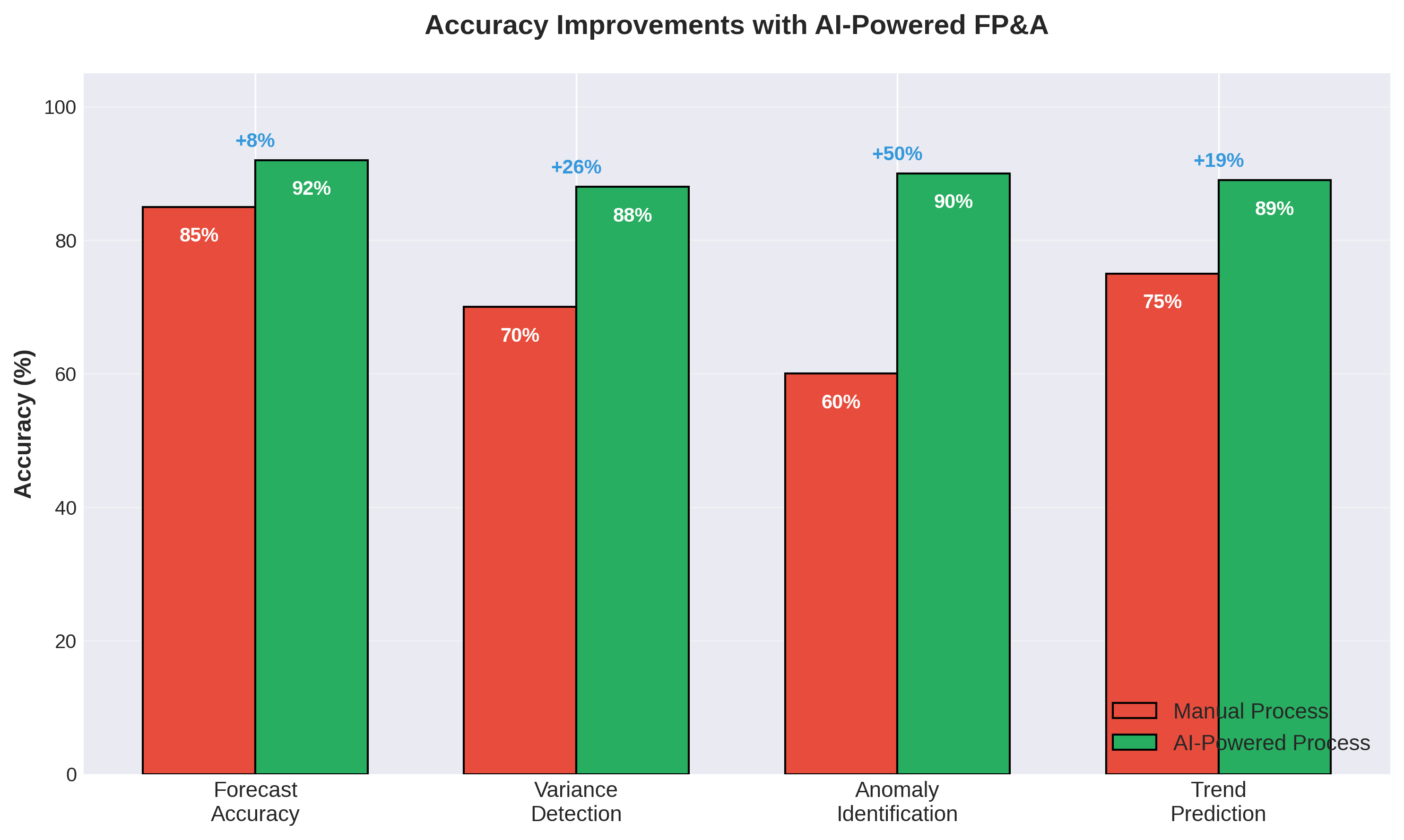
Time savings are compelling, but AI also delivers significant accuracy improvements:
Forecast Accuracy: +7 percentage points
Manual forecasting typically achieves 85% accuracy. AI-powered models, trained on historical data and external factors, can reach 92% accuracy—a 7-point improvement that translates to better business decisions .
Variance Detection: +18 percentage points
Human analysts catch about 70% of significant variances during manual review. AI systems, with their ability to analyze every line item against multiple benchmarks, detect 88% of variances—ensuring nothing slips through the cracks.
Anomaly Identification: +30 percentage points
Perhaps most impressively, AI excels at spotting unusual patterns. While manual analysis identifies 60% of anomalies, machine learning algorithms can flag 90% of anomalies—often before they become serious problems.
Trend Prediction: +14 percentage points
AI’s pattern recognition capabilities improve trend prediction from 75% to 89% accuracy, enabling more proactive decision-making.
Real-World Implementation: A Step-by-Step Approach
Phase 1: Assessment (Week 1)
Document your current process:
•Map out every step in your variance analysis workflow
•Quantify time spent on each activity
•Identify pain points and bottlenecks
•Determine which data sources are involved
Set clear objectives:
•Define target time savings (e.g., reduce from 12 to 4 hours)
•Establish accuracy improvement goals
•Identify which insights you want to add (that you can’t do today)
Phase 2: Tool Selection (Week 2)
Choose your AI toolkit:
•Microsoft Copilot (for Excel integration and natural language queries)
•Copilot Studio (for building custom AI agents)
•Power Automate (for workflow automation)
•ChatGPT/Gemini (for narrative generation and analysis)
•Perplexity (for research and context gathering)
Consider integration requirements:
•Compatibility with existing systems (ERP, BI tools)
•Data security and compliance needs
•User training requirements
Phase 3: Pilot Implementation (Weeks 3-4)
Start with one variance category:
•Choose a manageable scope (e.g., revenue variances only)
•Build your first automated workflow
•Test accuracy against manual process
•Gather user feedback
Example Pilot Project: Automate revenue variance analysis
1.Use Power Automate to extract monthly sales data from ERP
2.Build a Copilot Studio agent to calculate variances
3.Use ChatGPT to generate variance commentary
4.Create a Power BI dashboard for stakeholder review
Phase 4: Scale and Optimize (Weeks 5-8)
Expand to additional categories:
•Apply learnings from pilot to other expense/revenue areas
•Automate more complex analyses (multi-dimensional variances)
•Integrate predictive analytics
Continuous improvement:
•Refine AI prompts based on output quality
•Train machine learning models on your specific data
•Gather stakeholder feedback and adjust reports
The ROI Calculation: Is AI Worth the Investment?
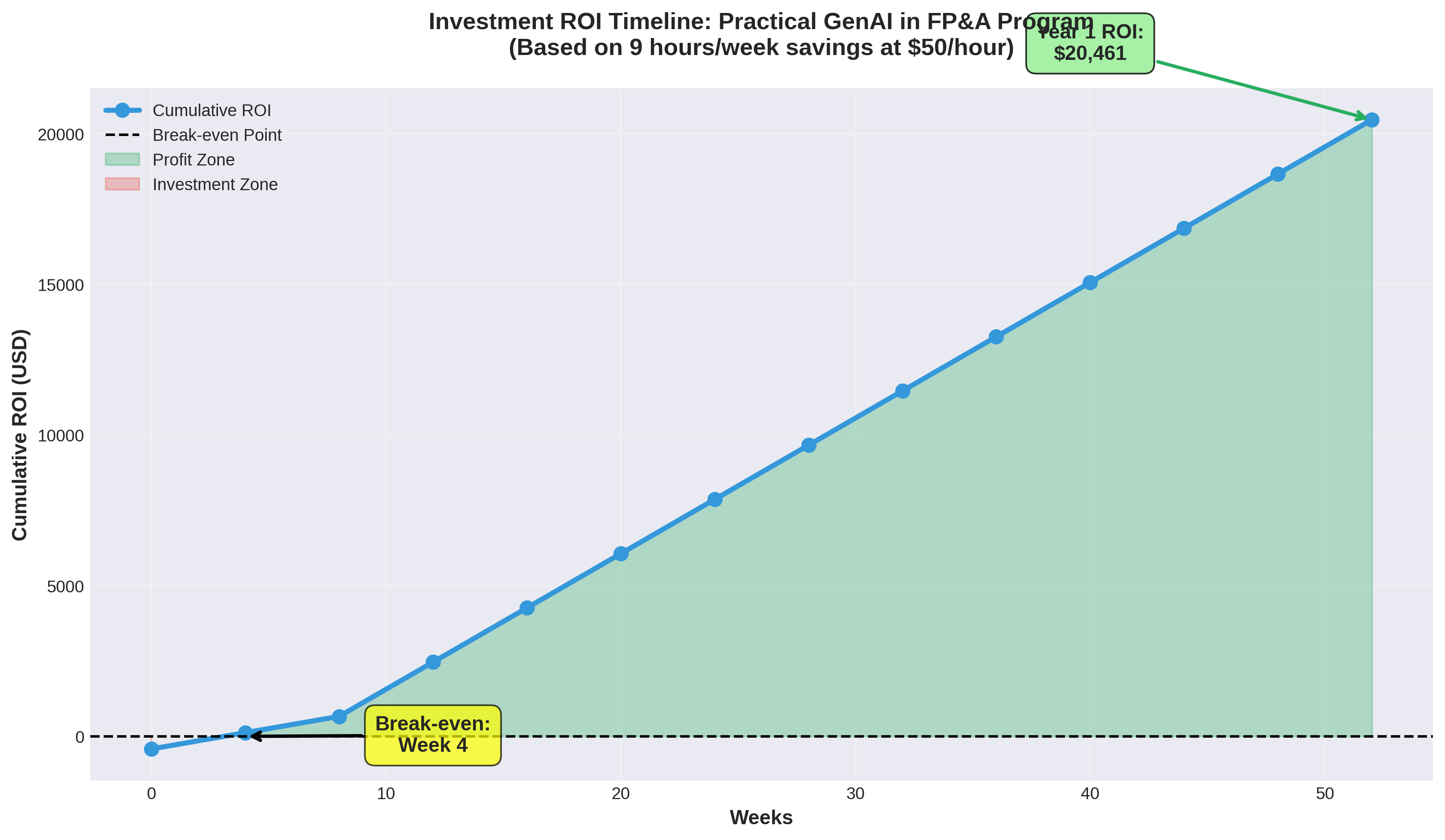
Let’s do the math on a typical FP&A professional’s AI investment:
Investment Costs
Training Program: $419 (Practical GenAI in FP&A – 8 weeks) Software Subscriptions: Many AI tools are included in existing Microsoft 365 licenses Implementation Time: 20 hours over 8 weeks (during training)
Total Investment: ~$419 + opportunity cost of training time
Returns
Time Savings: 9 hours/week × 50 weeks/year = 450 hours/year
Value of Time Saved: 450 hours × $50/hour (average FP&A hourly rate) = $22,500/year
ROI: ($22,500 – $419) / $419 = 5,275% first-year ROI
Break-even Point: Less than 1 week of time savings
This calculation doesn’t even account for:
•Improved decision-making from better accuracy
•Reduced error costs
•Increased strategic value delivery
•Career advancement opportunities
Common Objections (And Why They Don’t Hold Up)
“AI will replace my job”
Reality: AI augments FP&A professionals, it doesn’t replace them. By automating routine tasks, AI frees you to focus on strategic work that requires human judgment, business context, and relationship skills. In fact, FP&A professionals with AI skills are seeing 15-25% higher compensation than those without .
“My data is too messy for AI”
Reality: AI actually excels at handling messy data. Machine learning algorithms can identify patterns, flag inconsistencies, and even suggest corrections. The key is starting with a pilot project and gradually improving data quality as you go.
“I don’t have time to learn new tools”
Reality: Modern AI tools are designed for business users, not data scientists. Natural language interfaces mean you can start getting value in hours, not months. An 8-week structured training program can take you from beginner to proficient.
“The initial investment is too high”
Reality: As shown above, the ROI is achieved in less than a week. The real question isn’t whether you can afford to invest in AI—it’s whether you can afford not to.
Getting Started: Your 8-Week Roadmap
Weeks 1-2: Foundation
•Learn AI fundamentals and FP&A applications
•Understand available tools and their capabilities
•Map your current processes for automation opportunities
Weeks 3-4: Hands-On Implementation
•Build your first AI-powered variance analysis workflow
•Create automated data extraction and cleaning processes
•Generate your first AI-assisted reports
Weeks 5-6: Advanced Techniques
•Implement predictive analytics
•Build custom AI agents for specific tasks
•Integrate multiple tools into cohesive workflows
Weeks 7-8: Optimization & Scale
•Refine your processes based on real-world use
•Expand to additional use cases
•Develop best practices for your organization
Conclusion: The Future of FP&A is AI-Powered
The 12-hour variance analysis problem isn’t just a time management issue—it’s a strategic imperative. In an era where agility and real-time insights are competitive advantages, finance teams can’t afford to spend 70% of their time on manual data processing.
AI offers a clear path forward:
•75% time savings (9 hours/week)
•5-10% accuracy improvements
•5,000%+ ROI in the first year
•Career advancement through new skills
The question isn’t whether AI will transform FP&A—it’s whether you’ll be leading that transformation or playing catch-up.
Ready to Transform Your Variance Analysis Process?
The Practical GenAI in FP&A program provides everything you need to implement AI-powered variance analysis in your organization:
✅ 8 weeks of hands-on training with live sessions ✅ Build 3 production-ready AI tools including automated variance analysis ✅ Learn from 15+ years of FP&A expertise (Ahmed El-Shamy, Microsoft Partner) ✅ Access to elite AI tools: Perplexity Pro, Prompt Library ($2,200+ value) ✅ Small cohort (25 seats max) for personalized attention
Investment: EGP 19,599 (~$419 USD) ROI: Break-even in less than 1 week of time savings
References
About the Author: This article was created by DigiSoul, a Microsoft Partner specializing in AI training for finance professionals. Our Practical GenAI in FP&A program has helped hundreds of finance professionals transform their workflows and advance their careers.
Keywords: AI in FP&A, variance analysis automation, financial planning AI, FP&A automation tools, AI for finance professionals, generative AI FP&A, Microsoft Copilot for finance, automated variance analysis, FP&A productivity, AI training for finance


